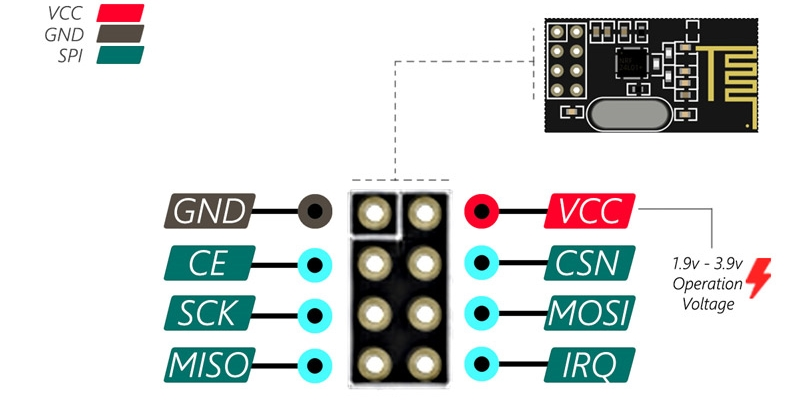
NRF24L01 2.4 Ghz'de çalışan 125 kanala sahip bir kablosuz alıcı/verici modülüdür.2Mbps ye kadar veri hızına 100Mt'ye kadar iletişim mesafesine sahiptir. SPI ile veri transferi sağlar.
GND Toprak pinidir.
VCC Güç pinidir. 1,9 ila 3,9 arasında bir voltaj verebilirsiniz. Arduino ile kullanımda 3.3V çıkışa bağlayabilirsiniz. 5V pinine kesinlikle bağlamayın. Güç ile alakalı problemler yaşamamak harici bir besleme kullanmak daha iyidir.
CE aktif bir HIGH pinidir. Seçildiğinde, NRF24L01 hangi moduna bağlı olarak veri gönderir ya da alır.
CSN aktif bir LOW pinidir ve normalde HIGH tutulur. Bu pin LOW olduğunda NRF24L01, SPI portunu veri alımı moduna geçirir.
SCK SPI haberleşme için gerekli olan saat hareketlerini kabul eder.
MOSI NRF24L01’in SPI girdisidir.
MISO NRF24L01’den SPI çıkışıdır.
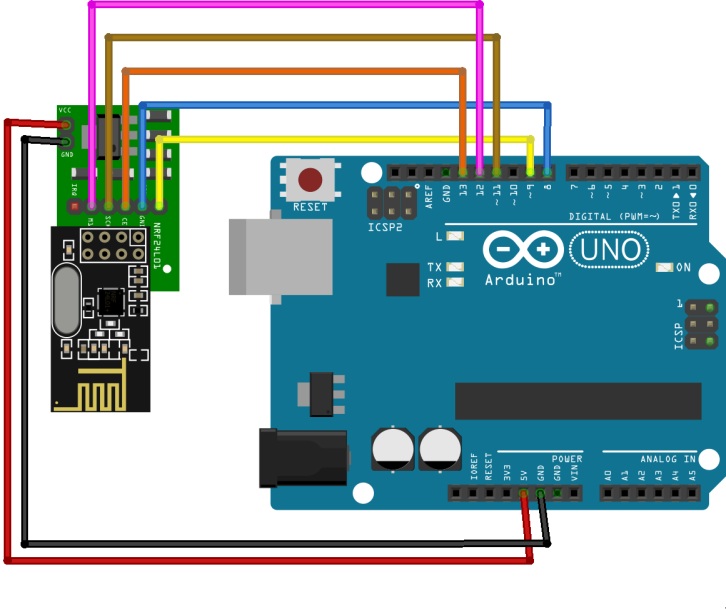
Yukarıdaki gibi devreyi kuralım.
Arduino IDE ye RF24 kütüphanesini kuralım.
/*
* NRF24L01 Arduino_ Uno Arduino_Mega Blue_Pill(stm32f01C)
* __________________________________________________________________________
* VCC | 3.3v | 3.3v | 3.3v
* GND | GND | GND | GND
* CSN | Pin10 SPI/SS | Pin10 SPI/SS | A4 NSS1 (PA4) 3.3v
* CE | Pin9 | Pin9 | B0 digital (PB0) 3.3v
* SCK | Pin13 | Pin52 | A5 SCK1 (PA5) 3.3v
* MOSI | Pin11 | Pin51 | A7 MOSI1 (PA7) 3.3v
* MISO | Pin12 | Pin50 | A6 MISO1 (PA6) 3.3v
*
*
*/
//
////
//
#include <SPI.h>
#include <nRF24L01.h>
#include <RF24.h>
RF24 radio(9, 10); // CE, CSN
//RF24 radio(PB0, PA4); // CE, CSN on Blue Pill
//RF24 radio(PA4, PA3);//stm
const uint64_t address = 0x5443322110ULL;
boolean button_state = 0;
//int led_pin =PC13; //set the led indicator to pin B6
void setup() {
//pinMode(PC13, OUTPUT);//stm
pinMode(13, OUTPUT);
//pinMode(PB10, OUTPUT);
//digitalWrite(PB10, LOW);
Serial.begin(115200);
radio.begin();
radio.setChannel(76);
radio.setAutoAck(1, true);
radio.setDataRate(RF24_1MBPS);
radio.setCRCLength(RF24_CRC_8);
//radio.setPayloadSize(5);
Serial.print("ADDRESS :");
radio.openReadingPipe(0, address); //Setting the address at which we will receive the data
radio.setPALevel(RF24_PA_MIN); //You can set this as minimum or maximum depending on the distance between the transmitter and receiver.
radio.enableDynamicPayloads();// *** Dynamic Payload aktif et ***
radio.startListening(); //This sets the module as receiver
}
void loop() {
if (radio.available()) //Looking for the data.
{
//Serial.println("Radio is sniffing");
char text[32] = ""; //Saving the incoming data
radio.read(&text, sizeof(text)); //Reading the data
radio.read(&button_state, sizeof(button_state)); //Reading the data
if (button_state == HIGH) {
digitalWrite(13, HIGH);
Serial.println(text);
} else {
digitalWrite(13, LOW);
Serial.println(text);
}
}
delay(5);
}
Verici Kodu:
/*
* NRF24L01 Arduino_ Uno Arduino_Mega Blue_Pill(stm32f01C)
* __________________________________________________________________________
* VCC | 3.3v | 3.3v | 3.3v
* GND | GND | GND | GND
* CSN | Pin10 SPI/SS | Pin10 SPI/SS | A4 NSS1 (PA4) 3.3v
* CE | Pin9 | Pin9 | B0 digital (PB0) 3.3v
* SCK | Pin13 | Pin52 | A5 SCK1 (PA5) 3.3v
* MOSI | Pin11 | Pin51 | A7 MOSI1 (PA7) 3.3v
* MISO | Pin12 | Pin50 | A6 MISO1 (PA6) 3.3v
*
*
*/
#include <SPI.h>
#include <nRF24L01.h>
#include <RF24.h>
RF24 radio(9, 10); // CE, CSN
//RF24 radio(PB15, PA4); // CE, CSN //stm32
const uint64_t address = 0x5443322110ULL;
int button_pin = 2;
boolean button_state = 0;
void setup() {
//pinMode(PB10, OUTPUT);
pinMode(button_pin, INPUT);
radio.begin(); //Starting the Wireless communication
radio.setDataRate(RF24_1MBPS);
radio.setChannel(76);
radio.openWritingPipe(address); //Setting the address where we will send the data
radio.setPALevel(RF24_PA_MIN); //You can set it as minimum or maximum depending on the distance between the transmitter and receiver.
radio.stopListening(); //This sets the module as transmitter
//digitalWrite(PB10, LOW);
}
void loop()
{
button_state = digitalRead(button_pin);
if(button_state == HIGH)
{
const char text[] = "Your Button State is HIGH";
radio.write(&text, sizeof(text)); //Sending the message to receiver
}
else
{
const char text[] = "Your Button State is LOW";
radio.write(&text, sizeof(text)); //Sending the message to receiver
}
radio.write(&button_state, sizeof(button_state)); //Sending the message to receiver
delay(1000);
}